Automate Your GitHub
Your contributions,
automated.
Push automated GitHub contributions from your phone. One tap. Every day.
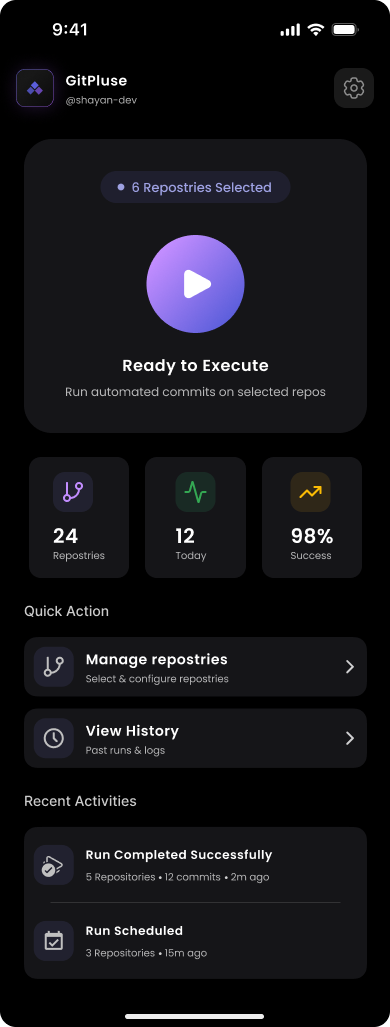
Automate Your GitHub
Push automated GitHub contributions from your phone. One tap. Every day.
Select your repos, hit play, and GitPulse commits for you automatically.
Watch each repository commit in real-time with progress bars and status updates.
OAuth tokens encrypted locally. Your source code is never read, copied, or stored.
Only one device can run at a time, preventing duplicate or conflicting commits.
Every run is logged with timestamps, repo counts, and success or failure status.
Choose exactly which repos to include, set commits per run, toggle private repos.
Sign in with GitHub. We only request the permissions we need.
Choose which repositories to include. Toggle private repos on or off.
Hit play. GitPulse handles everything in the background, even if you close the app.
GitPulse is designed with your privacy as a first principle — not an afterthought.
Your GitHub OAuth token is encrypted and stored locally on your device only. It is never transmitted to our servers — we don't even have servers that could receive it.
All logic — scheduling, token management, commit execution — runs entirely on your phone. There's no backend, no cloud sync, and no data collection of any kind.
GitPulse pushes empty commits — no file changes, no content. We literally cannot read your source code, even if we wanted to. Your repositories are yours, always.
We built GitPulse the way we'd want a tool built for ourselves — private, local, and honest.— Wexpa Team
Download GitPulse and start your streak today.
Get it on Google Play Android 7.0+ required